

Sometimes it’s always good and time preserving to embed tweets in WordPress instead of taking a screenshot of the tweet and uploading to your back-end. Uploading pictures reduces your storage space and increases your website or blog load-time particularly if the picture is heavy. If you embed tweets in WordPress you have the option to do many actions on the tweets such as reply, retweet and like, readers of that particular page on your blog or website can also Follow a Twitter user directly without having to open Twitter itself.
ICYMI: See how to Live stream videos from your Twitter app
How to Embed Tweets in WordPress
Visit the Twitter user page of the tweet you want to embed and scroll to the particular tweet.

Click on the arrow on top of the tweet as shown below. Click on the Copy link to Tweet option afterwards.
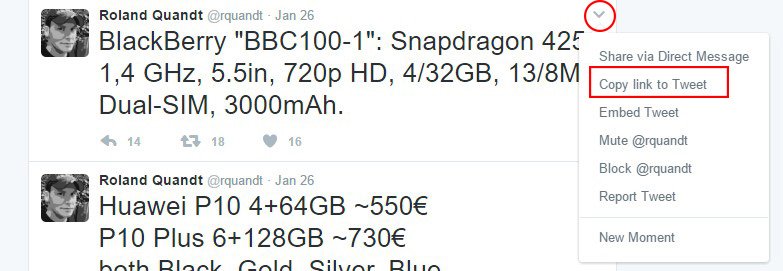
A URL appears which you can share anywhere. Copy the URL.

Log-in to your WordPress back-end. Add a new topic if you just want to compose a new article or open one and edit. In your composer, put the typing cursor to where you want the tweet to appear.
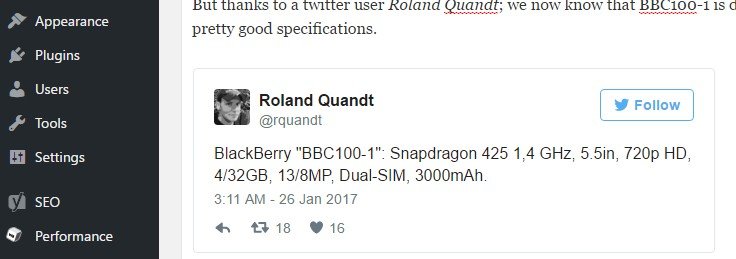
Paste in your composer, automatically it shows the embedded tweet just like when a YouTube video is embedded in WordPress.

That’s how you embed tweets in WordPress.

