

Email is one of the oldest means of online communication and is almost free to use, but your Internet service provider, ISP, will charge you for data while sending or receiving emails. The history of today’s email services dates back to the early days of ARPANET (one of the technologies that established the foundation of the Internet) with standards used to encode email messages published far back in 1973.
It is interesting to note that an email message, which was sent in the early 1970s, has a similar look to a basic email, which is sent in this day and age. In modern times, email is used for business or personal purposes, and every mobile device (both tabs and smartphones) running Android and iOS offers an email app, which is pre-installed on it.
Top Email Apps for Android and iOS Platforms
There are many third-party email apps on iTunes and the Play Store that come with enhanced features and capability than the default e-mail program. Below, we will be exploring the 5 best email apps for Android and iOS platforms:
Gmail
Gmail — alternatively called Google Mail — is a very popular email app with millions of users all over the world. On Google Play Store alone, it has been downloaded over 1 billion times. It supports both Android and iOS and comes pre-installed on a lot of Android mobile phones. This app is straightforward to use and offers 15GB of free storage. Designed with a user-friendly interface, some of its features are, customizable push notifications, bookmarking of messages, group discussions, and blocking of spam before it enters your inbox.
Gmail is, definitely, among the leading email applications on Google Play Store for Android users and iTunes for iOS users. It helps in organizing your inbox into social & promotional emails, all arranged in a neat manner. Gmail app supports multiple accounts with both Gmail and non-Gmail addresses.
Download from the Play Store, Download from iTunes.
Microsoft Outlook

With over 100 million downloads and 3 million+ reviews on Google Play Store, Microsoft Outlook is undoubtedly a great email app. It helps millions of Android and iOS phone owners connect every one of their email accounts, calendars as well as files, all in one easily accessible spot. This software provides fast and efficient email service with many other features that work on the move, such as Microsoft Word, Excel & PowerPoint integrations.
Microsoft Outlook has an easy-to-use UI with robust cloud storage integration. It also works in tandem with Gmail, Microsoft Exchange, Yahoo Mail, Outlook.com, and Office 365. It is a great managing tool, designed by Microsoft Corporation, to help you in staying up-to-date with any schedules you have made. It is free to download on both Google Play Store and iTunes. When you open the program, the inbox will first list out your most crucial emails. This app allows you operate more than one account.
Download from the Play Store, Download from iTunes.
Newton Mail
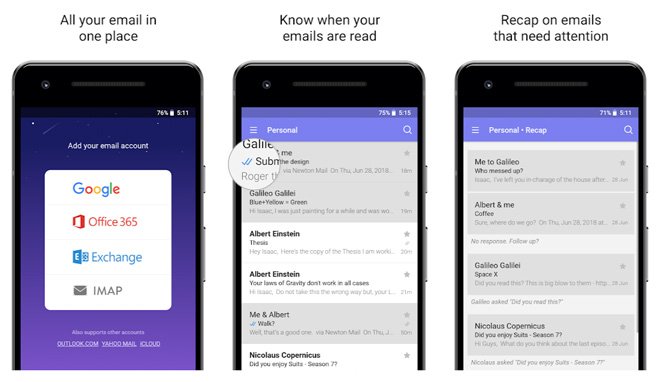
Newton Mail was developed by CloudMagic and has been downloaded more than 1 million times on the Play Store. It is an effective email client that comes as a good alternative to the native Gmail application. Newton Mail offers a range of exciting features, including Email Tracking, Undo Send, Send Later, Calendar, and lots more. It is a subscription-based program, popular for its smart searching capabilities, cross-platform functionality, and beautiful UI.
Newton Mail offers you a tidy inbox, whose content can be kept safe and secure with the aid of a passcode. It is also compatible with MacOS and ChromeOS, apart from Android and iOS.
Download from the Play Store, Download from iTunes.
myMail
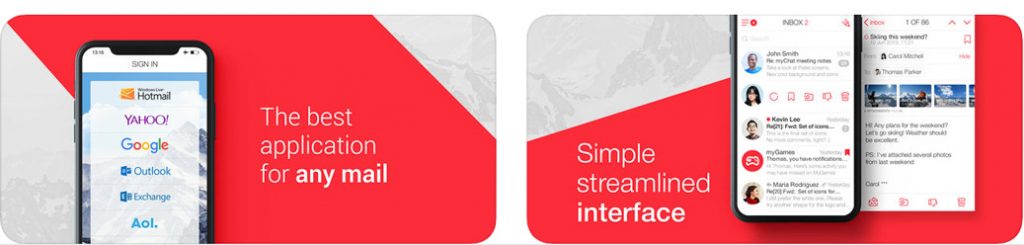
my Mail, designed by My.com B.V., is another top email app for Android and iOS, with over 10 million downloads and 315,000+ reviews on the Play Store. It supports all major email service providers in addition to other POP3 or IMAP-enabled mailbox. It keeps all your emails safe and secure in one spot and ensures that your communication is not only fast, but also light and mobile-friendly. myMail allows real-time customizable notifications, data compression for sending or receiving emails, and smart search.
Download from the Play Store, Download from iTunes.
Aqua Mail
Aqua Mail was created by MobiSystems and released on the Play Store on December 26, 2011. It has been downloaded over 1 million times on this platform and offers dependable email service for all providers, such as Yahoo, Gmail, Hotmail, Outlook, and others. This app comes with several features, including the use of a very secure login technique (OAUTH2), widget-like message counts, push mail, swiping in message list & between messages, and others. Aqua Mail is not compatible with devices running iOS.
Download from Play Store.
These are the best 5 email apps for Android and iOS. You can download and install any one of them to send and receive emails on your phone with ease.


