

Yes! TECNO Phantom 6 Plus Nougat update is finally here! TECNO promised and they actually delivered. We all know this as always been the problem with TECNO devices not getting upgrades for the next Android OS, finally they have had a change of heart and listened to the outcry of their customers. The Nougat update has only been rolled out to Phantom 6 Plus as at today and we do not know when other devices will be getting Nougat update yet.
Major Highlights of the Phantom 6 Plus Nougat Update
- Upgraded from Android Lollipop to Android Nougat N
- Added the Hi Theme
- Added the snapshot function in fingerprint
- Added the OneKeyTransfer APK
- Added the Split screen function
- Added watermark feature in Camera
- Optimized stability and performance
- Upgraded to HIOS 2.2
See more update feature in the image below.
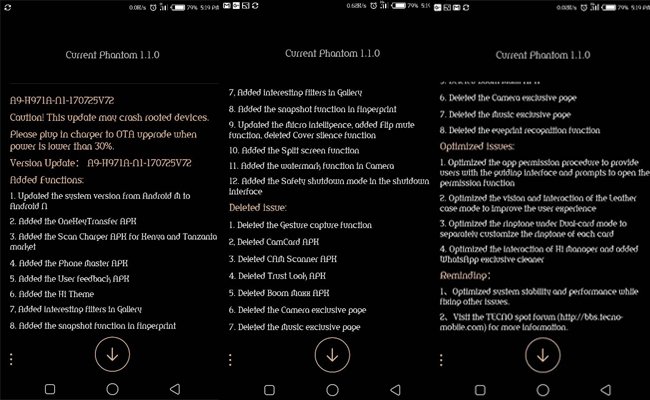
TECNO Phantom 6 Plus Nougat Update – How to Upgrade
- Update size is around 1.7GB, its advisable you have a minimum of 2GB data before embarking on upgrade. You can use WiFi or a very strong internet connection.
- Update may crash rooted devices. If you’ve rooted your Phantom 6 Plus before it is advisable you unroot it.
- Ensure you have at least 6GB free memory space on your smartphone.
- If you’ve not automatically been prompted to begin the Nougat update on your notification bar go to phone Settings > About phone> System Update and begin update download.
- After you’ve finished downloading the files update it will automatically unzip and your Phantom 6 Plus will reboot.
- It will automatically install the new Android Nougat in about 7 minutes.
- Your phone is now running on Nougat and you can start exploring the beast that is Phantom 6 Plus.
Another Method to Upgrade Phantom 6 Plus to Nougat via SD Card
Credit to Team Hovatek for puling this off, the update becomes slow sometimes and people have problems downloading from the Tecno servers. With this method, you can update to Android Nougat via the SD Card.
- Download the Tecno Phantom 6 Plus A9-H971A-N1-170725V72 Nougat Tcard update.zip by Team Hovatek
- Unzip the downloaded update with your file manager
- Copy the update.zip to the Phantom 6 Plus SD card or internal storage
- Boot your phone into recovery by pressing Voulme Up + Power button simultaneously
- Tap Apply update from SD card
- Scroll and locate where you copied the update.zip and select
- Wait for the update to install now automatically
- Reboot phone once the update is done and start flexing the Nougat on your Phantom 6 plus.
DON’T MISS: TECNO WX3 Specifications and Price in Nigeria and Kenya
What are your thoughts about the TECNO Phantom 6 Plus Nougat update?


How to make the split of the screen please
Watch this video https://www.youtube.com/watch?v=hLOjaVIDf20
Mine download to 100%. Says unzipping and then error message appears. Then it will start the download all over again.
What is the problem?
What’s the free space on your device?
26GB
Mine, had the same issue, so I tried the SD card method, I’ve downloaded it but it keeps saying updating failed.
Also mine, the update downloaded and in the process of updating it say ‘Error’