

Gone are those days when you have to use the service of a photographer to snap your pictures on a special occasion or just for fun. Today, you can shoot a photo with just your Android smartphone or iPhone. In spite of this breakthrough in digital technology, you will still need to polish the photos using a photo editing app. These programs help you adjust your picture’s brightness, orientation, contrast, etc. You can even add an eye-catching inset or text in the photo. Here are the 10 best photo collage apps for Android and iOS:
Best Photo Collage Apps for Android and iOS
VSCO

This is the most powerful photo-editing app among professional photographers as a result of its nifty editing abilities as well as advanced effects. It offers instant editing tools such as white balance, highlights, shadows, exposure, and so on. With just one-click, it lets you polish a photo using any of it numerous preset filters. This program offers you natural looking cool effects and is perfect for Instagram. It is only available on iOS.
Download from iTunes for free or $19.99 for the premium version
2. Photoshop Express
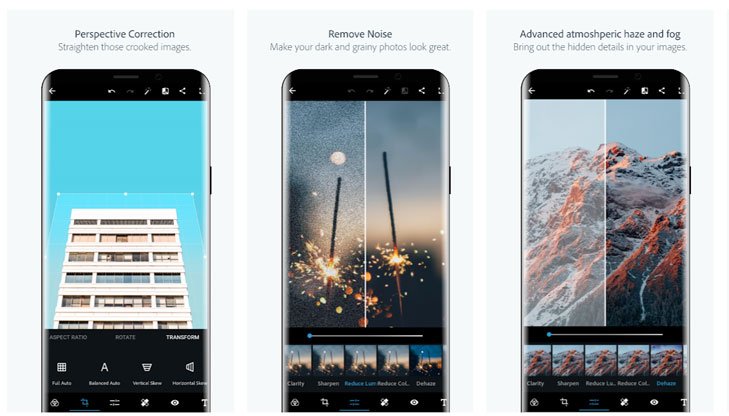
Adobe Photoshop Express is a big name in the photo-editing niche. Designed with a simple and minimalistic UI, it is an amazing app that is perfect for quick, painless and powerful editing on your smartphone. Photoshop Express is loaded with great features, including crop, rotate, straighten, flip photos, etc. The software comes with one-touch filters, a wide range of effects, auto fix, colours, frames as well as a handful of advanced tools such as Image Rendering Engine. This is used for handling large files such as panoramic photos. The app is available on Android and iOS platforms.
Download from the Play Store. Download on App store for iOS
3. PicsArt Photo Studio
PicArts Photo Studio is another photo collage app that is compatible with both Android and iOS platforms. It has more than 100million downloads, making the piece of software one of the favourite photo-editing programs available on the market. Some of its attractive features are a wide variety of options for customizing photos; an inbuilt camera feature as well as a social network for the sharing of pictures. It also offers collage, stickers, draw, frames, and many others.
Download from Google Play Store. Download on App store for iOS
4. Adobe Lightroom
Adobe Lightroom comes with remarkable controls with effective synchronization. The editor also supports both iOS and Android OS. It is a popular app due to its advanced mobile editing tool, providing many unique features such as exposure, white balance, colour, gradient, and clarity settings. It also features one-tap presets to do instant editing, and supports sharing of photos on social media networks like Facebook, Twitter, Instagram, and others.
Download from the Play Store Download on App store for iOS
Enlight

Enlight is ideal for users, seeking more controls on geometric adjustments, masking features, and localized image editing requirements. Its user interface is responsive and fast. The software is actually among the best photo-editing apps and provides a variety of preset styles, textures, light leaks, borders, frames, and collage layouts. This app allows you to create photo montage quickly with ease.
Download on App store for iOS
6. Aviary photo editor
This photo editor is a part of the Adobe family. It offers super-intuitive UI and basic features like crop and filter, and also advanced editing tools like colour adjustments, lighting, sharpness, the ability to tweak vignette and focus. The Android program is not only multi-functional but also reliable. It is available for free, but with a handful of in-app purchases.
Download from Google Play Store
Google Snapseed
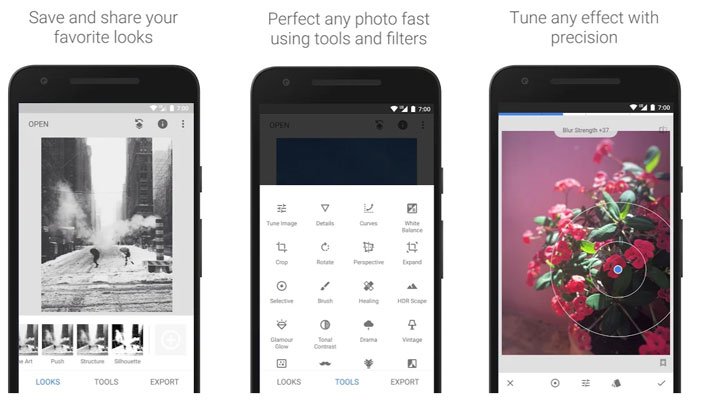
Google Snapseed is one of the most powerful photo collage apps for Android, with an impressive array of editing tools for customizing brightness, contrast, and colour of a photo. It comes with different geometric correction features as well as a collection of advanced filters for hassle-free editing, involving glamour glow, grunge, lens blur, Noir, HDR scape, and frames.
Download from the Play Store
Photo Mate R3
Photo Mate R3, while costly, is an app that is commonly used by professionals as it can easily process images in JPEG format. It can also process raw data, conveniently, and comes with advanced controls for accessing localized colour corrector, blur adjustments, lens corrector, sharpening, and several others.
Download from the Play Store.
9. PhotoDirector
This can be regarded as a multi-purpose photo-editor app. It provides a stylish and easy-to-use UI, which allows you to adjust colours and tone of your photos, quickly, using its simple but robust tools. PhotoDirector offers an in-app camera option for applying live photo effects as you take pictures.
Download from Google Play Store.
10. Toolwiz Photos-Pro Editor
This is a gorgeous multipurpose PRO photo editor, which comes with over 200 great tools. It lets you add filters, adjust saturation, swap faces as well as create collages for fun. The program is free and straightforward to use. Some of its other features are Prisma filters, HDR, Image tone, Text, and free online resources.
Download from Google Play Store.
Related: Mobile Photography – 6 Best Photo Editing Apps for Android
Please, share your opinion about these apps in the comment section below.

You made me remember those days that photogrid was the biggest app for this job. I always use it then when designing pics for my Facebook profile.