
Over the years, Android has emerged as the colossus of the mobile operating system niche — a feat it achieved owing to the impressive array of customization features it provides for its customer base. Launchers represent a major category in these customizable offerings. Since operating an Android smartphone without a launcher is impossible, every device running on this OS comes with a default launcher that is pre-installed on it. Typically, a launcher app consists of a home screen as well as the catalogue of all the default and installed apps on your device. Owing to a number of limitations with pre-installed launcher apps, you might need to download and install third-party software in this category to enjoy exciting features of your smartphone to the fullest. These are the best Android launcher apps this year:
10 Best Android Launcher Apps
Nova Launcher

This app is definitely one of the most powerful and best Android launcher apps around. Not only is it efficient and lightweight, but also fast. Nova Launcher offers notification badges, dock customizations and an option, which when turned on, displays apps used frequently as a top row in this app drawer. It features folder and icon customizations, along with a host of gestures. The app also allows app shortcuts, an offering found in Android Nougat.
Go Launcher
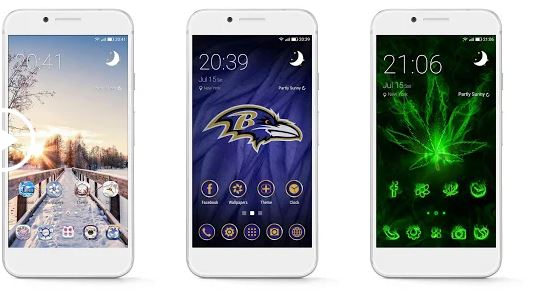
This software is one of the most downloaded launcher apps on Google Play Store with more than 100 million downloads. Every Android smartphone owner has to get this launcher to completely transform the style of their device and enhance its performance. Go Launcher comes with a bevvy of free themes and wallpapers, which you can change twice daily if you so desire. It provides more than 20 transition effects by default, in addition to many fascinating widgets such as weather forecast, calendar, search, and so on. Further, this launcher also helps you manage apps, hide and lock the programs. It has an option for boosting your phone by simply tapping a button. Go Launcher is updated on a regular basis in a bid to offer you the style in vogue every day.
Buzz Launcher

Buzz Launcher has several nifty customizing options, along with the exciting feature that supports shared home screens. Lately, this launcher was listed as the editor choice on Play Store. On many occasions, it has been a featured app on the platform. Buzz Launcher does not give you any headache with annoying ads and has enjoyed millions of downloads by users spread all around the world. Buzz Launcher contains thousands of free wallpapers as well as themes from which you can choose.
Evie Launcher
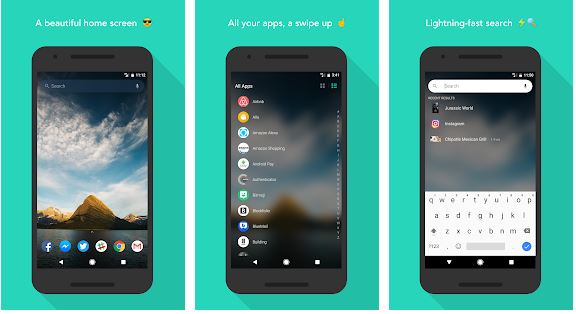
One of the fastest Android launcher apps around, this software dazzles many users with its smoothness and attractive customization offerings. Evie Launcher has a Universal Search option for performing searches within an app from one place. The lightweight program provides several home screen shortcuts as well as customizations. It also helps in customizing app drawer and folder grid. It supports icon packs that can be downloaded on Google Play Store.
Action Launcher

Action Launcher is ubiquitous in the Android world. Its latest update offers a Pixel-like experience and has an innovative Google Now integration. Furthermore, Action Launcher creatively blends the customization features like app shortcuts as well as gestures. One of the most spectacular capabilities of this tool is that its swipe gesture also doubles up as a shortcut, allowing you open a folder’s primary app with just a tap. By swiping up, the contents of the folder become revealed.
Aio Launcher
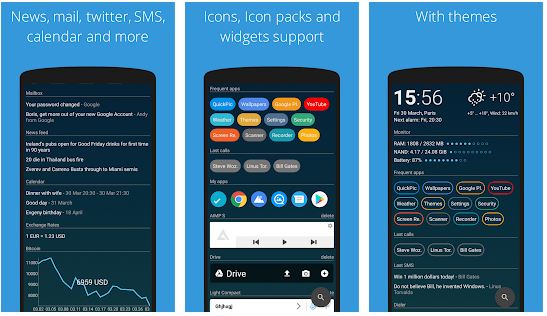
Home screen tweaks and customization are very common options in most Android launcher apps. But AIO Launcher is one step ahead of the game with its outstanding appearance. In place of fancy icon packs as well as animations, the app now sports an information-oriented home screen. This feature will contain apps used frequently at the top, in addition to frequent contacts and unread text messages. Other offerings of Aio Launcher include alarms and RAM monitoring; time and weather information. And if you do a quick downward scroll, this will reveal your news feed, emails, and call-log.
ADW Launcher 2

ADW Launcher 2 offers a plethora of configuration options. Its interface is fluid and allows you to download a number of free themes. Some of the most outstanding offerings of this launcher app are its quirky Android Marshmallow and KitKat themes. ADW Launcher also provides a number of other free features like gestures. This is one of the best Android launcher apps around.
EverythingMe Launcher
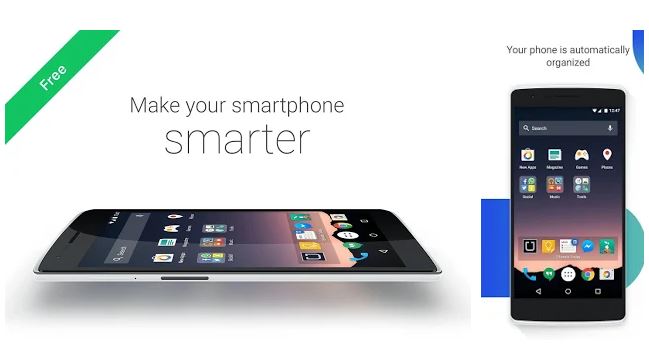
If you’re a kind of phone user who has an aversion for organizing stuff into little folders in a neat manner (as most of us are), this launcher app has got your back. EverythingMe is a contextual launcher that arranges every one of your apps, preferences, messages, and contacts neatly into Smart Folders. On top of that, its gesture support is top-notch: A double tap will open your phone camera by default and a swipe down will launch the Quick Search option. Apart from this, this app also has a provision for Quick Contacts, which will fetch your frequently used contacts instantly with no setup needed.
Hola Launcher
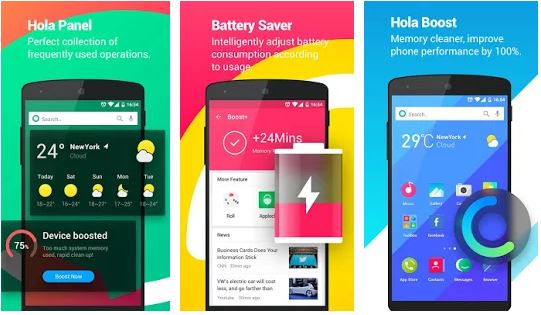
You will be wowed with this simple yet powerful launcher app. It is an all-in-one solution with endless features. Hola Launcher provides the options to modify themes and wallpapers, saves battery, and boosts your phone memory. It also offers charring protector via app manager to ensure your Android smartphone keeps working optimally at all times. The launcher also helps you boost the speed of games and other apps by freeing up RAM and external memory.
Apex Launcher

The focus of this tool is more on the design and styles in vogue to ensure your device looks up to date. It allows you to experience the most fashionable trends and niftiest home screens. Apex Launcher has been rated as the best Android launcher by LifeHacker before and featured on Play Store many times. It lets you enjoy up to 9 home screens with scrollable dock. Apex Launcher is extremely fancy and provides creative transitions effects and custom icon packs.

Hello there,
My name is Aly and I would like to know if you would have any interest to have your website here at howtotechnaija.com promoted as a resource on our blog alychidesign.com ?
We are in the midst of updating our broken link resources to include current and up to date resources for our readers. Our resource links are manually approved allowing us to mark a link as a do-follow link as well
.
If you may be interested please in being included as a resource on our blog, please let me know.
Thanks,
Aly