
Facebook’s Profile Pics Frame is a cool way the community allows its users to show their support for a particular cause, cheer on favourite sport team or celebrate an important achievement in life. You could add country flag to Facebook profile picture to show your patriotism, you could also add your favourite football’s team club badge on your profile picture. The list is endless.
How to Add Country Flag to Facebook Profile Picture
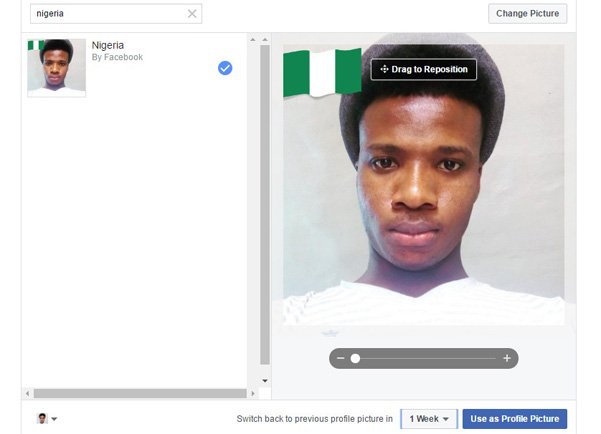
- Visit the Facebook Profile Pics Frame Page here. You see a screen as shown below…

- I’m from Nigeria, so I will type my country’s name in the search box. The Nigerian flag appears on my profile picture. You have the option to reposition and drag to anywhere you want on your profile picture. You can also make the picture larger or bigger. After doing this, choose the time frame you want the picture to appear as your profile pic after which it would revert back to your original picture you were using before.

- Finally, click on Use as Profile Picture
How to Add Your Favourite Football Club Badge to Facebook Profile Picture
- Visit the Facebook Profile Pics Frame Page here.
- I support Chelsea Football Club of England, so I typed Chelsea in the search box. Drag your profile pic to reposition, choose a time frame as well.
- Finally, click on Use as Profile Picture

Show your support for a cause today. We are more powerful when we all come together as united.
DON’T MISS: How to Install and Play Facebook Gameroom games
Do not forget to share the article with your Facebook friends.
